Swipe Left or right to See more Photos
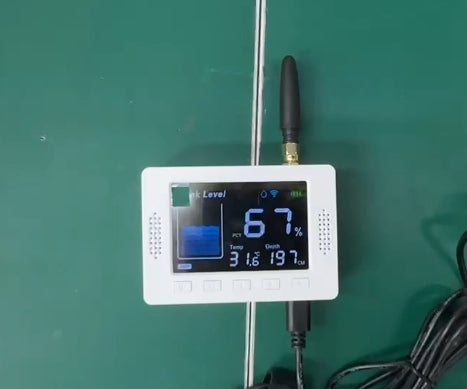
Wireless Tank Level Meter | WiFi Screen + RF Sensor | External Antenna | Stainless Sensor | New Model | EPTech.WiFi.RF.Plus
Wireless Tank Level Meter | WiFi Screen + RF Sensor | External Antenna | Stainless Sensor | New Model | EPTech.WiFi.RF.Plus
Couldn't load pickup availability
📡 Wi-Fi + RF Smart Liquid Level Meter for Tanks Support 3 Meter Depth | EPTech.WiFi.RF.Plus
🧠 Product Description
This smart liquid level measuring system is designed to provide maximum comfort, safety, and reliability when monitoring tanks. It allows you to track the level of water, diesel, or other liquids directly from your mobile phone or from the dedicated display, eliminating frequent manual checks and preventing unexpected empty tanks.
The system intelligently combines Wi-Fi connectivity and long-range RF radio communication, making it ideal for residential, agricultural, and industrial applications.
✨ Key Features & Advantages
◆ Easy installation and simple daily use
◆ Requires only a power source at the tank location and Wi-Fi inside the house
◆ Start monitoring quickly via mobile app or indoor display
📶 Advanced Wireless Communication
◆ Uses 400 MHz RF radio waves between the tank sensor and the indoor screen
◆ Reliable transmission up to 200 meters in open areas
◆ Strong signal performance inside buildings up to TEN floors
◆ Ensures stable data delivery even where Wi-Fi cannot reach the tank
📏 Accurate & Reliable Measurement
◆ Measurement depth up to 3 meters
◆ Accurate readings starting from 10 cm
◆ Suitable for different tank sizes and liquid types
◆ Provides dependable level data to prevent shortages or overflow
🛠 Professional Sensor Design
◆ Ultrasonic sensor made from stainless steel
◆ Stainless steel surface reduces water condensation buildup
◆ Prevents false readings common with plastic sensors
◆ Ensures higher long-term accuracy, especially in humid environments
📡 Enhanced Antenna Performance
◆ Both the sensor and the display use detachable external antennas
◆ Standard SMA connectors for secure antenna attachment
◆ 5 dBi antenna gain for wider coverage and stronger RF and Wi-Fi signal
◆ Better performance than internal or fixed antenna designs


🔌 Power & Installation Options
◆ Sensor powered by 5V DC adapter, Display Powered 5V DC adapter
◆ Optional solar panel power available (sold separately)
◆ Installation options include top-mounted on tank
◆ Optional wall-mount bracket available (sold separately)
📊 Main Technical Specifications
| Feature | Specification |
|---|---|
| Measurement Technology | Ultrasonic |
| Measurement Range | 10 cm to 3 m |
| Sensor Material | Stainless steel |
| Condensation Resistance | Yes |
| Display | 4" LED Screen |
| Liquids Supported | Water, diesel, non-corrosive liquids |
| Sensor to Screen Link | RF 400 MHz |
| RF Range | Up to 200 m open space |
| Building Coverage | Up to 10 floors |
| Wi-Fi Function | Display Wi-Fi connection, 2.4GHz, WPA2 |
| Antenna Type | Detachable external antenna |
| Antenna Connector | SMA |
| Antenna Gain | 5 dBi |
| Power Supply | 5V DC, For sensor & Screen |
| Power Options | Adapter or optional solar panel |
| Installation | Tank top or wall mount |
| Waterproof Rating | IP65 |
✅ Why Choose This Model
◆ Combines Wi-Fi and RF for maximum reliability
◆ Stainless steel sensor ensures higher accuracy
◆ Long-range communication without signal loss
◆ Flexible power and installation options
◆ Ideal for home, farm, and industrial tanks
🔌 Product Connection & Setup Guide
◆ Connect the AC/DC power adapter and power on the sensor , then Connect the Screen to DC
◆ Wait until the indicator light turns on, confirming the device is powered
📱 Install the Mobile App
◆ Download Tuya Smart App or Smart Life App on your mobile phone
◆ Install and open the app to begin setup
🔄 Reset Network Mode
◆ Press and hold the reset button for 5 seconds
◆ Release the button when the LED indicator starts flashing rapidly
◆ This indicates the network has been reset and the device is ready for pairing
📶 Connect Sensor to the App
◆ Enable Wi-Fi and Bluetooth on your mobile phone
◆ Open the app and select Add Device
◆ Follow the on-screen instructions to complete the connection